
 Install on Shopify
Table of Contents
Why Most Shopify Stores Lose Prime Day (And What Actually Works)
It's mid-July. A shopper who has bookmarked your brand lands on your store during Prime Day week. They have 12 tabs open. Eleven of them are Amazon. They see a generic "Summer Sale - 20% Off" banner on your site, shrug, and click back to Amazon because "I already have Prime." You paid for that click through your ad spend, your SEO, your email list. This guide is about making sure it doesn't happen this Prime Day.
And it's not just that one visitor. It's the pattern.
Every July, Shopify merchants watch their traffic and conversions dip as Amazon dominates consumer attention. Most stores either (a) ignore Prime Day entirely and accept the losses, or (b) try to match Amazon's discounts and destroy their margins in the process.
The stores that actually win Prime Day do neither. They don't compete on price. They can't win that battle. They compete on experience. A moment of genuine surprise. A reward that Amazon's algorithmic cart can't replicate. A reason for the shopper to remember the brand, not just the transaction.
That's what this guide is about.
TL;DR: What you'll have by the end of this guide:
- ✓A setup plan that takes under 5 minutes, no coding needed
- ✓A decision table so you know which method fits your store
- ✓The 5 mistakes that silently kill most Prime Day counter-campaigns
Gamification fundamentally alters shopper behavior. By forcing users to "hunt" for their discount:
- ✓
Even Shopify recommends gamification. Shopify's own research identifies gamification as a key strategy for increasing engagement, driving sales, and collecting valuable first-party data, which matters more than ever with Apple's privacy changes and third-party cookie deprecation.
- ✓
Prime Day drives $14+ billion in consumer spending. Amazon's Prime Day 2024 hit a record $14.2 billion in sales, but Adobe Analytics reported that non-Amazon retailers also saw a 6.1% spike during the same window, meaning hundreds of millions in search intent is flowing through Shopify stores during Prime Day week.
- ✓
Comparison shoppers are actively looking for better value. The Prime Day shopper who visits your store is already in comparison mode. They're evaluating "should I buy this on Amazon or here?" A gamified hunt with an exclusive reward makes your store the obvious winner for your own products, especially because they know your brand, unlike random Amazon third-party sellers.
4 Methods: How to Add a Prime Day Treasure Hunt to Shopify
Depending on your budget, technical skills, and time constraints, there are four primary ways to implement a gamified Prime Day counter-promotion on your store.
Method 1: The App Way
Using a dedicated Shopify gamification app like Treasure Quest.
- ✓ Time: ~5 Minutes
- ✓ Code required: None
- ✓ Lead Capture: Automated
- ✓ Dynamic Codes: Yes (One-time use)
- ✓ Multi-Page Hunts: Supported fully
Best for merchants who want zero bugs, high conversions, and immediate deployment.
Method 2: DIY Custom Code
Hiring a Shopify developer to write custom Liquid, HTML, and JS, along with a custom backend.
- ⌛ Time: 6+ Months (Minimum)
- ⚠️ Cost: $10,000 - $30,000+ (Devs & Servers)
- ❌ Maintenance: Dev team required for all changes
- ❌ Analytics: Demands heavy custom implementation
Best for massive enterprise brands with custom in-house dev teams and a limitless budget.
Method 3: The Manual Way
Hiding a flat image or text code at the bottom of a blog post or page.
- ⌛ Time: 5 Hours (Sourcing & Editing)
- ✓ Cost: Free
- ❌ Lead Capture: Impossible to gate the discount
- ❌ Analytics: Zero tracking on who finds it
Best if you just want to put a promo code on a page and don't care about capturing emails or making it fun.
Method 4: Do It With AI
Using Cursor, Copilot, or Claude to generate custom code.
- ⌛ Time: 6+ Months (Minimum)
- ❌ Lead Capture: Must host your own external servers
- ⚠️ Cost: Very High (Hidden server & API costs)
- ❌ Analytics: Extremely complex to wire up and track
- ❌ Maintenance: You own the entire custom codebase
Only attempt if you are a seasoned software engineer with half a year to kill on a promotion.
How to Set Up Your Shopify Prime Day Treasure Hunt
Using Treasure Quest, you can launch a dynamic hunt without writing a single line of code.
Install the Gamification App
Install Treasure Quest from the Shopify App Store and launch your gamified Prime Day campaign in under 5 minutes. Design a hunt that flawlessly matches your store's unique brand. Zero coding required. Built exclusively for Shopify using the latest Theme App Extensions, it guarantees a seamless integration with no manual scripts and zero residual code or mess left behind if you ever uninstall.
Design Your Prime Day Icons
You have two top options. You can choose from our cross-holiday library of treasure icons (lockboxes, gold coins, mystery gifts, jeweled keys), or create brand-new icons using our AI tool that feel distinctly premium and stand apart from Amazon's generic aesthetic. The goal is a memorable visual moment, not a forgettable sale banner.
Your Prime Day Assets: Done For You or Built by AI
We know store owners don't have hours to source graphics. Choose from our massive pre-built library of premium gamification assets, or generate exactly what matches your brand using our integrated AI Studio.























AI Creator Studio
Generate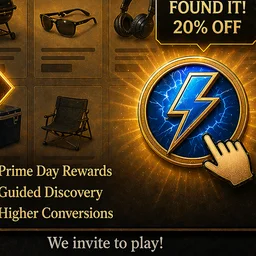
Set The Rules
Take complete control over the hunt. Curate the perfect journey by choosing exactly where your Prime Day icons appear. You have the ultimate flexibility to include them only on specific collection pages or effortlessly exclude them from any page you want. Dial in precision triggers like Exit Intent, Time on Site, or Pages Visited to ensure shoppers find them at the exact right moment.
Configure the Reward Capture
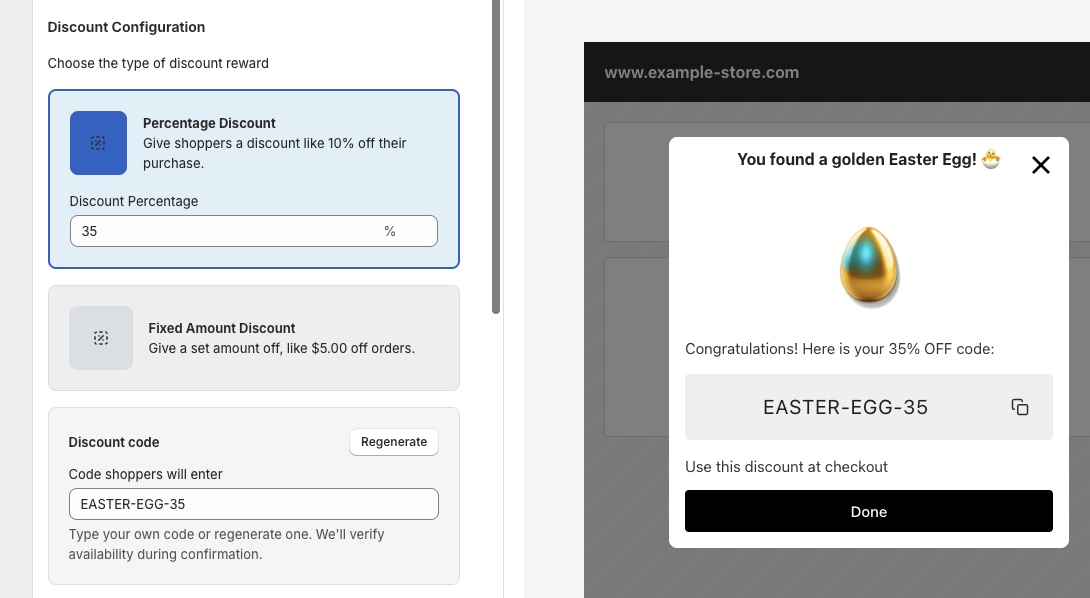
This is the moment your Prime Day counter-hunt turns into revenue. Finding the hidden treasure is fun, but a phenomenal reward is what actually drives the conversion, and what closes the gap with Amazon's perceived discount advantage.The gamification element almost guarantees they will give you their email. So at a minimum, you're building your list for future marketing. But to close them instantly, you need to offer something they can't get anywhere else on your site (and certainly not on Amazon). By giving them an exclusive, earned reward, you dramatically increase the likelihood of an immediate direct-to-consumer checkout instead of an Amazon purchase.
5 Prime Day Hunt Mistakes That Kill Shopify Campaigns
Don't let simple errors ruin your holiday sales. Avoid these common pitfalls to ensure your gamification campaign drives massive revenue, not frustration.
Ignoring Prime Day Entirely
Many Shopify merchants assume Prime Day "doesn't affect them" because they don't sell on Amazon. This is the biggest mistake. Prime Day puts your customers in aggressive comparison-shopping mode for 48 hours, and if you aren't visible with a differentiated offer, they'll default to Amazon for adjacent categories, including yours next time they need something you sell.
The Fix: Show Up With a Differentiated Offer
You don't need to beat Amazon's prices. You need to give your loyal customers a reason to choose you specifically. A gamified hunt with an exclusive reward positions your store as a smarter, more rewarding alternative, without touching your margin.
Trying to Match Amazon's Discounts
Matching Amazon's Prime Day percentages is a race to the bottom you cannot win. Amazon subsidizes those discounts across a 300-million-product catalog. If you match 30% off to "compete," you're destroying your margins to fight on Amazon's terms.
The Fix: Compete on Experience, Not Price
Offer a smaller headline discount (say, 15%) paired with an experience Amazon can't replicate: a treasure hunt, a free branded gift, handwritten note, expedited shipping, or a loyalty-points double-up. Your margin stays intact and your brand becomes memorable.
Using Generic, Weak Rewards
If a user takes the time to follow your clues and hunt down a hidden treasure, do not offer them the same generic discount code they could have found by googling your brand, or worse, the same discount Amazon is offering on a similar product. Your reward needs to be exclusive and memorable.
The Fix: Offer Irresistible, Exclusive Value
Offer a reward that feels distinctly earned and uniquely yours, like a "Smarter-Than-Prime 25% Off," free expedited shipping, or a free signed / branded gift with qualifying purchase that Amazon literally cannot match. When the offer feels exclusive and personal, the likelihood of an instant direct-to-consumer conversion skyrockets.
Launching the Morning of Prime Day
By the time Amazon Prime Day starts at midnight, comparison shoppers have been researching for days. A same-day launch means you've missed the pre-Prime research window when shoppers are actively deciding where to buy.
The Fix: Start 3 Days Before Prime Day
Run your campaign from 3 days before Prime Day through 2 days after. This captures pre-Prime researchers, Day 1 comparison shoppers, Day 2 decision-makers, and post-Prime regret-buyers. Treasure Quest lets you schedule start and end dates so the campaign runs on autopilot.
The "Silent Launch" (Zero Promotion)
"If you build it, they will come" does not apply to eCommerce, especially during a window when Amazon is spending billions on advertising. Simply dropping an icon on your site and waiting for people to stumble across it guarantees low engagement.
The Fix: Hype It Up
Launch with a bang. Tease the hunt on Instagram 3 days before Prime Day ("Don't waste your Prime Day. We hid something better on our site..."), send an email to your list the morning of launch, and add a striking announcement bar to your store. Position yourself as the smarter alternative.
Treasure Quest vs. The Alternatives
Discount apps don't create experiences. Popup apps limit interaction to a single page. Gamification apps are one-and-done. See exactly how Treasure Quest compares across every feature that matters.
| Feature | ✨ Treasure Quest ⓘThe all-in-one Shopify app that turns your store into an interactive treasure hunt with AI icons, native discounts, and full-funnel analytics. | Basic Hunt Apps ⓘShopify apps that hide icons or eggs on your storefront for customers to find and collect. | Gamification Apps ⓘInteractive popup apps like spin-the-wheel, scratch cards, and slot machines for email capture. | Discount Apps ⓘTools for creating, managing, and automating discount codes, pricing rules, and BOGO offers. | Popup Apps ⓘGeneral-purpose popup, banner, and form builders for email capture and promotions. |
|---|---|---|---|---|---|
| ⏱️ Launch Time | Under 5 minutesGuided wizard with smart defaults. Pick icons, set reward, go live. No dev work. | 15–30 min per campaign. Manual icon, page, and code setup. | 10–15 min. Customize wheel segments, colors, and win probabilities. | Fast for basic codes, but stacking, tiers, and BOGO need extensive config. | Quick for banners, but targeting rules and A/B tests add setup time. |
| 🎨 Icon Library | 100+ hand-crafted icons per seasonPrime Day, Easter, Halloween, Christmas, Valentine's. All ready instantly. | Under 15 stock icons total across all seasons. | N/A. Wheel segments only. | N/A | N/A. Generic stock images. |
| 🤖 AI Icon Generator | Built-in AI generationText-to-icon in seconds. 19 art styles, 18 color palettes. 100 free generations/month. | No AI generation. | No | No | No |
| 🎁 Seasonal Campaigns | Ready-to-launch themes & logicEaster, Halloween, Christmas, Valentine's. Just pick and launch. No rebuilds needed. | Handful of seasonal icon sets. Manual swaps required each holiday. | Manual holiday wheel skin swaps each season. | Can schedule sales, but no seasonal creative or theming built in. | Static templates rebuilt manually for each holiday. |
| 🗺️ Multi-Page Discovery | Site-wide or targeted huntsShoppers explore your whole store finding hidden icons. Drives page views, longer sessions, and deeper product discovery. | Basic single-page triggers based on page visits or time on site. | Single-page widget. One spin and done. | N/A. Discount rules, not shopper experiences. | Single-page popup trigger only. |
| 🎯 Display & Targeting | Precision control7 icon animations, scroll-anchored or fixed positioning, smart triggers (time delay, page-visit count, exit-intent). Include/exclude pages by URL. | Limited icon placement. Basic page selection. | Exit-intent, scroll %, or timer triggers. Page-level targeting varies. | Product- and cart-level rules. Not visual display targeting. | Advanced: exit-intent, scroll %, device type, geo-location, cart value. |
| 💰 Discount Integration | Create & edit discounts inside the appUses Shopify's own discount creator. Full control over rules, limits, and eligibility without leaving setup. | Basic in-app discount creation. Limited rules and eligibility options. | Auto-generated coupon codes injected into wheel prizes. | Core strength. Auto-apply, stackable codes, bulk generation, BOGO, volume tiers. | Auto-generated unique codes on some apps, static codes on others. Limited discount rules. |
| 📧 Email & Lead Capture | Built-in reward popups with email captureCustom form fields, marketing consent, privacy links, branded confirmation emails. | Basic email field at claim time. | Primary strength. Strong email/SMS capture with Klaviyo, Mailchimp integrations. | Not a lead capture tool. Focused on pricing. | Primary strength. Powerful email/SMS with deep ESP integrations. |
| 📊 Analytics & Drop-Off | Full-funnel trackingImpressions, clicks, popups, form fills, discount copies, checkouts, and revenue. Per-quest drop-off breakdowns. | Basic view and click counts. | Popup impressions, email signups, conversion rates. Some offer A/B testing. | Redemption counts and revenue per code. | Open, click, and conversion rates. A/B test results. |
The Bottom Line
Treasure Quest brings it all together: discovery-driven engagement across your entire store, AI-powered custom icons, native Shopify discount integration, and full-funnel analytics that show you exactly where to improve. And you can launch it all in under 5 minutes.
Shopify Prime Day Treasure Hunt: Merchant FAQ
Answers to every question merchants ask before launching their first gamified Prime Day counter-campaign.
Launch & Compatibility
Can I launch a Prime Day counter-hunt in under 5 minutes without a developer?
Yes. Upload your own custom Prime Day icons or use our built-in AI tool to generate brand-new assets on the spot. Set your reward, enable the quest, and you're live. Treasure Quest installs through Shopify's native Theme App Extension with a single click. No developer, no code.
Is Treasure Quest compatible with Shopify 2.0 and mobile-first themes?
Yes, 100%. The app is built on Shopify's Online Store 2.0 architecture.
If I'm using a premium custom theme, will the icons break my existing mobile layout?
No. The icons float on top of your pages without touching any of your existing layout.
Can I run the hunt only during Prime Day week?
Yes. You can schedule exactly when your quest goes live and when it ends. Run a 48-hour Prime Day blitz or a full "counter-week" campaign. When the date passes, the hunt deactivates automatically.
Growth & Conversion
How is Treasure Quest different from spin-to-win wheels or other gamified discount apps?
Three things matter most. First, creative flexibility. Treasure Quest includes a built-in AI Design Studio. Second, campaign-level analytics. Our dashboard breaks down Click-Through Rate and Conversion Rate at every step of the funnel. Third, visual quality. Our icon library includes premium animations that make the experience feel polished.
Why is a treasure hunt better than a standard Prime Day discount pop-up?
A pop-up is what every other store has. During Prime Day, shoppers are already comparing tens of products across multiple tabs. A generic pop-up gets dismissed instantly. A treasure hunt flips that dynamic. Instead of giving away margin upfront, you create a branded experience Amazon literally cannot replicate. The shopper browses more of your products, spends more time on your site, and leaves with a memory of your brand, not just a transaction.
Does my Shopify store actually get affected by Prime Day?
Yes. Adobe Analytics reports that non-Amazon retailers see a 6.1% spike in online sales during Prime Day week as comparison-shopping intent spills across the broader web. The shoppers are actively in "evaluate and purchase" mode. A well-timed counter-hunt captures that intent directly.
Should I try to match Amazon's 30%+ Prime Day discounts?
No. Matching Amazon on price is a margin-destroying race you cannot win at scale. Instead, offer a smaller headline discount (15–20%) paired with experiential value. A gamified hunt, a free branded gift, expedited shipping, or a loyalty bonus. That Amazon cannot replicate. Your margins stay intact and your brand becomes memorable.
How do I prove to my team that a Prime Day counter-hunt is generating revenue?
Your dashboard tracks exact, down-to-the-penny ROI. By tying every completed checkout directly to the discount code assigned to your quest, the system measures your absolute Revenue Generated ($) and net new Orders in real-time.
Will this gamification cannibalize existing sales from people who were already going to buy direct?
No. You have total control over where the hunt happens. You can block icons from appearing on high-intent pages like your cart or checkout. This guarantees you are only incentivizing comparison-shoppers, not handing free discounts to loyal customers already at checkout.
What rewards work best for a Prime Day counter-hunt specifically?
Anti-Amazon, experience-forward rewards consistently outperform price-matching. "Smarter-Than-Prime 25% Off" exclusive codes, free expedited shipping (matches Amazon Prime shipping), signed/branded free-gift-with-purchase, and limited-edition bonuses Amazon can't stock all work exceptionally well.
Is there a free plan so I can test this before committing?
Yes. You can install and launch your first quest on our free plan to see the results for yourself.
Strategy & Setup
How does the treasure hunt work for the shopper?
You place one icon per campaign. In standard mode, the shopper finds it and claims their reward. In Progressive Mode, the shopper has to find icons across multiple pages before unlocking the final prize.
Does it work for stores with small catalogs?
Yes. For Prime Day counter-campaigns, a tight focused experience often outperforms sprawling hunts. It mimics the feel of a "secret menu" discount rather than a cluttered sale.
How should I announce my Prime Day counter-hunt to customers?
Position yourself as the smarter alternative. Tease on social media 3 days before Prime Day ("Don't waste your Prime Day. We hid something better on our site..."), send email Sunday night before Prime Day Tuesday, and add a subtle announcement bar.
When should I launch my Prime Day counter-hunt?
Setup takes under 5 minutes. The highest-performing campaigns go live 3 days before Prime Day to capture pre-event researchers, then run through 2 days after to catch regret-buyers who decided Amazon's deal wasn't that good.
User Experience & Conflicts
I already have a welcome pop-up and a loyalty widget. Will a treasure hunt overlap and make my site look spammy?
Treasure Quest is built to complement your marketing stack, not step on it. You can tell the app exactly which pages icons should never appear on.
My audience is older or less tech-savvy. Is finding these icons going to confuse them?
The experience is intuitive. The icons are highly visual, tapping them works across all devices, and the reward flow is linear and simple.
What if my customers aren't engaging with the hunt?
Try switching up the icon to something more eye-catching, increasing the reward value, or moving the trigger to a higher-traffic page.
What happens after Prime Day? Should I turn it off?
If the campaign performed well, keep it running. Swap the Prime Day icons for Back to School or Labor Day campaigns. Update the reward, and you have a brand-new campaign live in seconds.
Trust & Reliability
Is Treasure Quest safe for my store's code and loading speed?
Yes. Treasure Quest loads in the background without blocking your store from rendering. And because we use Shopify's native app-embed blocks, there is zero code residue.
If the hunt breaks during a traffic spike, how fast will someone help me?
We run active monitoring during peak campaign windows and prioritize holiday campaigns. Most questions are answered within 12 hours.
What permissions does Treasure Quest require?
Permissions to create new discounts, capture new emails, and verify new orders. That is the full list.